Articles · AI Design
When an AI-made logo turns blurry once you enlarge it: what to check in Ideogram Vector 1.0
On October 22, Ideogram released Vector 1.0, its first vector model, which makes editable SVGs from text or from an existing image. What Ideogram's API docs and press coverage say, the reported prices, and what is still unknown about layers and live text.
Translated from the Korean original. Read in Korean
The client's email is two lines. "I like the AI logo. We'll use it on business cards and a banner, so please send the original file."
What you have is one PNG. Blow it up to banner size and the edges go soft. The print shop wants an AI or SVG file, meaning a vector. Many people hit exactly this wall when they try to use image-AI output for real work.
On October 22, Ideogram released Ideogram Vector 1.0, its first vector model. Describe something in text and you get an SVG. Upload an existing picture and it converts it to a vector. This piece reports only what I verified in Ideogram's API documentation and in coverage of the launch.
Before you read
- I did not run the model myself. Everything below comes from the developer docs and reporting based on Ideogram's announcement.
- Ideogram's X post, blog and product page did not open for me (access denied). I only saw the announcement wording through quotes in search results and articles.
- The two documentation pages I opened list no prices. The price table below comes from two outside articles that cite Ideogram's published rates, and the numbers matched.
- I found no independent test of the output. "Clean" is, for now, Ideogram's description.
- Which app plan includes it, and how many credits it costs in the app, was not stated.
Raster and vector in one line
Raster images are built from pixels, so they blur when enlarged. Vector images are built from points and curves described by math, so lines stay sharp at any size. Logos, icons, signage and merchandise printing often require vector files. Most image AI so far returned raster only, and converting to vector was a separate job.
As relayed in coverage, Ideogram's announcement says you can generate clean, editable SVGs with smooth gradients and sharp typography from a text prompt, or turn any image into a detailed, scalable vector. It is live in the Ideogram app and the API.
What the official docs show
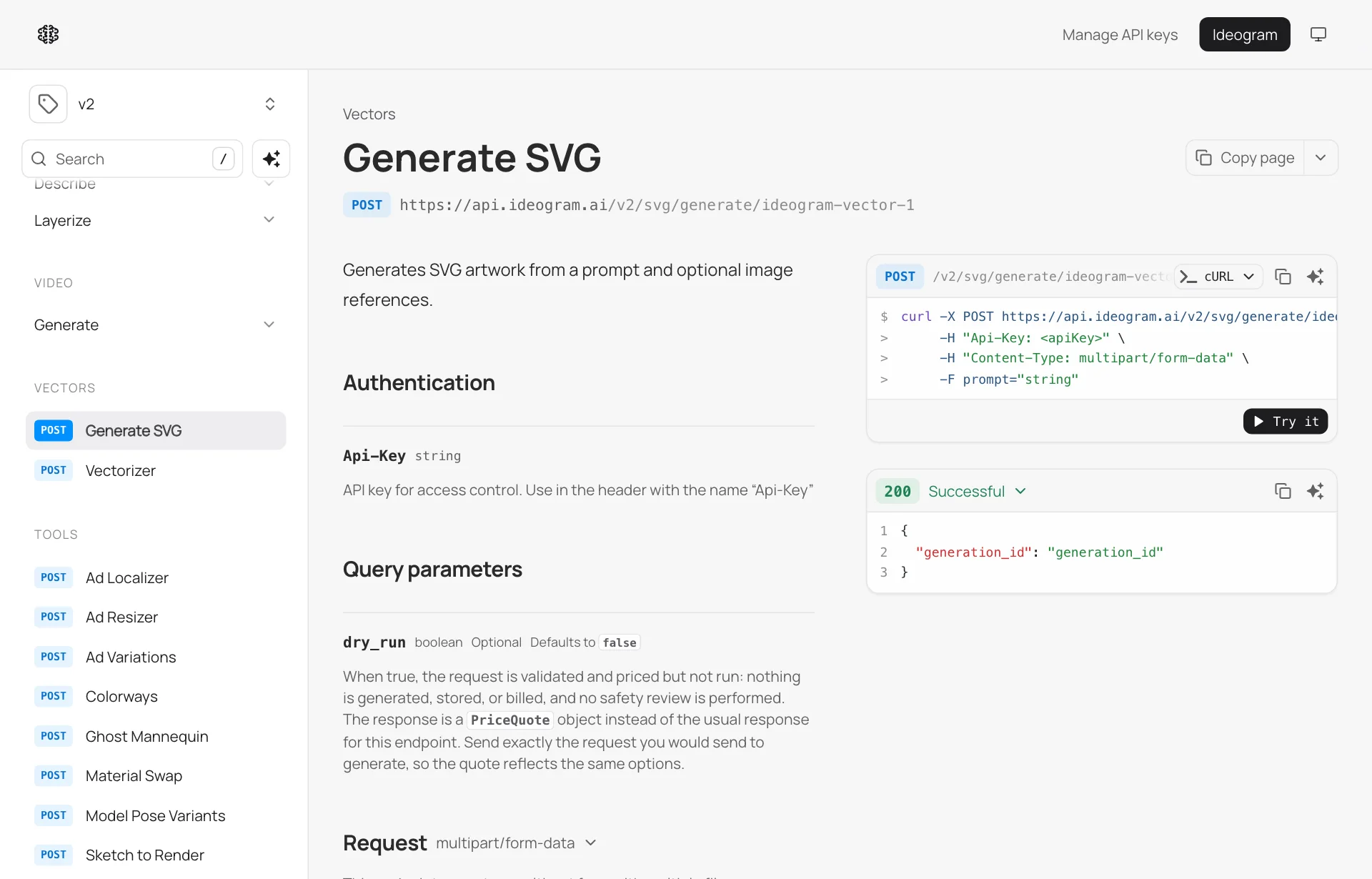
The API docs describe two separate jobs.
| Job | Endpoint | What you send |
|---|---|---|
| Make an SVG from text | POST /v2/svg/generate/ideogram-vector-1 | Prompt (required), optional reference images, aspect ratio, quality, count, seed |
| Convert an image to SVG | POST /v2/svg/vectorize/ideogram-vector-1 | A JPEG, PNG or WEBP file (up to 50 MB), a detail mode |
Source: Ideogram developer docs: Generate SVG, Vectorizer. The table condenses the parameters on those two pages.
For conversion, the docs list three detail modes. simple uses fewer shapes, detailed keeps fine detail, and auto picks what suits the image. One outside article calls the modes Simple and Default; the docs use the names above.
Other things confirmed in the docs:
- Outputs are private by default, and always private on enterprise accounts.
- A request does not return the file directly. You get a job ID (
generation_id) and fetch the result separately. - With
dry_runon, the API prices a request without generating or billing it. Handy before a big batch. - There is a limit on simultaneous jobs, and exceeding it returns a 429 error. The docs also list other rejection reasons such as a daily limit or a required subscription.
Neither page says anything about layers, text handling or gradient quality. You only learn that by opening the output files.
The reported prices
| Job | Per image, API |
|---|---|
| Text to SVG, low quality | $0.13 |
| Text to SVG, medium quality | $0.16 |
| Text to SVG, high quality | $0.20 |
| Text to SVG, high quality with reference images | $0.32 |
| Image to vector | $0.10 |
Source: Creators Toolbox: Ideogram Vector, OrcaRouter: What the SVG File Actually Holds. Both cite Ideogram's published rates and give the same numbers. I could not confirm the prices on the official developer docs pages.
Doing the math, ten high-quality outputs cost $2.00. That is not a heavy amount if you are showing a client several options. It is an API price, though. The in-app credit cost is unknown.
Three things to open first
First, are the shapes separated into layers? According to outside articles, Ideogram says generated SVGs come back with shapes you can move individually. For the image-to-vector side, they say grouping shapes into layers is "not yet available." The conversion doc I opened shows no such option. If you convert a photo or a PNG logo, expect a flat pile of overlapping paths and plan time to clean it up in Illustrator or Figma.
Second, does the text stay text? The announcement stresses "sharp typography." Whether that type is editable text or outlined shapes is not stated in any source. If you need to fix one typo in a logo's name, the difference matters. Outlined letters mean retyping, and the typeface is unknown.
Third, how many points are there? SVGs heavy on gradients and detail can contain thousands of paths. An outside article notes files may get large but gives no figure. For web icons, check file size and rendering speed. For print, check stroke widths and overlapping fills.
Coverage repeats that the files open for editing in Illustrator or Figma. That, too, is Ideogram's description. Whether the file structure is pleasant to work with is a separate question.
Next to what already exists
This is not the first AI that outputs vectors directly. One search result described Recraft as producing SVG natively. What is new here is less "an AI makes vectors" and more "a well-known image-generation company shipped a dedicated vector model." I found no comparison showing which is better.
Image generators like Ideogram, along with AI logo and brand-kit tools, are collected with Recraft, Looka and others under image generation on AI design tools. Fixing an image instead of rerolling it is covered in Background changed and the logo changed too: what to check in Krea 3's edit model. That one is raster editing; this one is vector output, so they serve different moments.
What is not known yet
- Output quality. No independent test shows whether it is stronger on logos, icons or posters.
- App pricing. Whether free accounts can use it, and what it costs in credits, was not confirmed.
- Commercial terms. Copyright and usage terms for this model's output were not in the material I opened. The general question is covered in Can you use AI-made images in client work. That is not confirmation that the same terms apply here.
- Editing. I saw no endpoint for revising a generated SVG by prompt, and outside articles also point you to a design tool for edits.
- What quality levels mean. The docs do not explain how low, medium and high differ.
What to do now
Sort raster from vector first. When a client asks for the original file, find out which format they actually need. Print, signage and merchandise need vector. Web illustrations are often fine as PNG. That saves you from swapping models when the real issue is the format.
Open about ten files. Generate one logo, one icon set and one poster with type, then open each in Illustrator or Figma. Note whether layers are separated, whether text is live, and how many points there are. That tells you what to hand to this model and what not to. If you use the API, check the price with dry_run first.
Reserve time for a human pass before delivery. A converted SVG may be one lump of overlapping shapes. Put color values, stroke widths and naming cleanup into your estimate, and "AI should make it quick" becomes easier to answer.
If there is a type of site you'd like me to find next, leave a comment. Requests become the first topic of the next collection.
Sources: Ideogram developer docs: Generate SVG, Vectorizer, Ideogram announcement (X), Runtime Wire: Ideogram launches its first vector model, Creators Toolbox: Ideogram Vector, OrcaRouter: What the SVG File Actually Holds, Future Tools news.